SkyzeAudio · guitar pedalboard · now on Google Play

Your whole pedalboard fits in your phone.

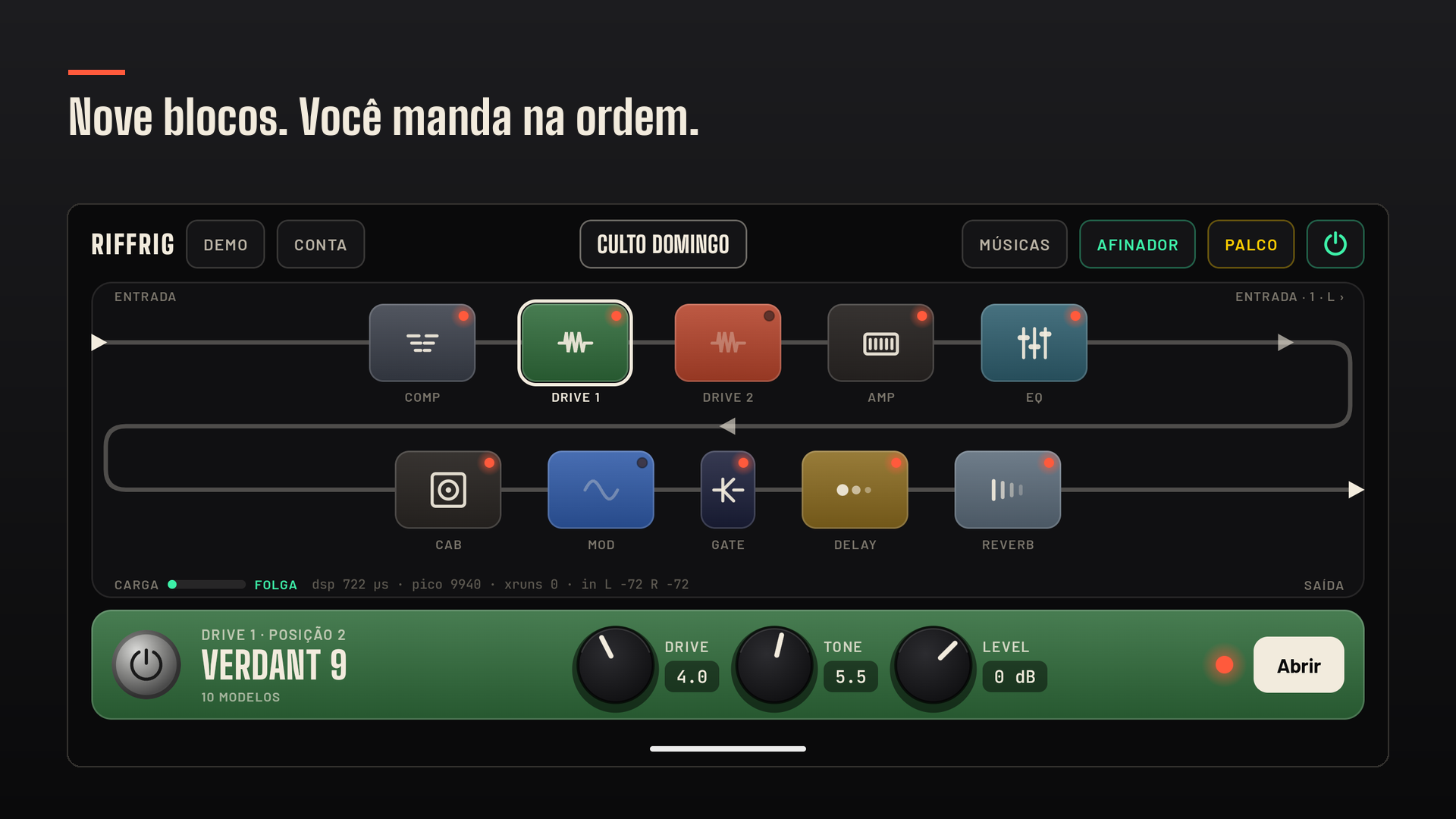
Nine blocks between your guitar and your headphones: compressor, two drives, amp, EQ, cabinet, modulation, delay and reverb — in the order you decide. No rack, no power supply, no spare cable.

The RiffRig chain on screen: nine blocks in sequence, with the selected pedal on the bottom strip

The sound comes out of your device. Not the internet.

Three things the stage demands.

Sounding good at home and falling apart at rehearsal is no use. RiffRig was built the other way round: survive the gig first, please the ear second.

Stage latency

The load meter sits right on the screen: you see how much of each block's time budget is gone before anything crackles. No guessing.

Works offline

The network stays out of your gig. Once the app is open, everything you play runs on the device — captures and IRs included.

The tone turns with the part

Setlists by song and by section. Intro, chorus, bridge: each with its own rig, and the switch happens as you move through the song.

Amps

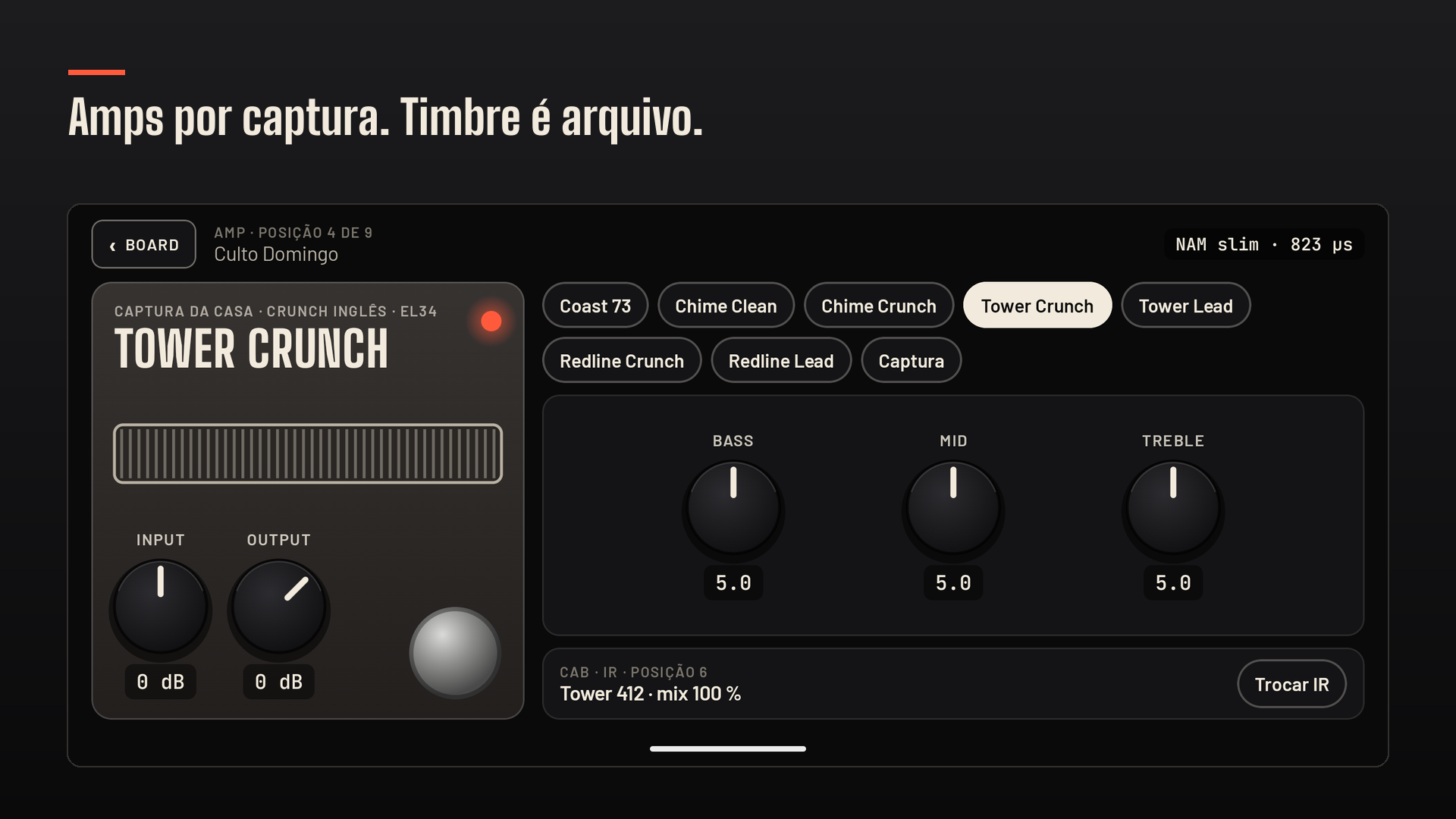
The amps aren't an impression from a distance. They're captures.

Coast 73, Chime Clean, Chime Crunch, Tower Crunch, Tower Lead, Redline Crunch and Redline Lead ship ready, one per channel, each with its cabinet as an impulse response. Got a capture of your own, or downloaded one from someone else? Import it and play — tone is a file, not a closed list somebody picked for you.

The amp screen in RiffRig: Tower Crunch selected among the captures, with bass, mid and treble knobs and the cabinet IR

Delay and reverb

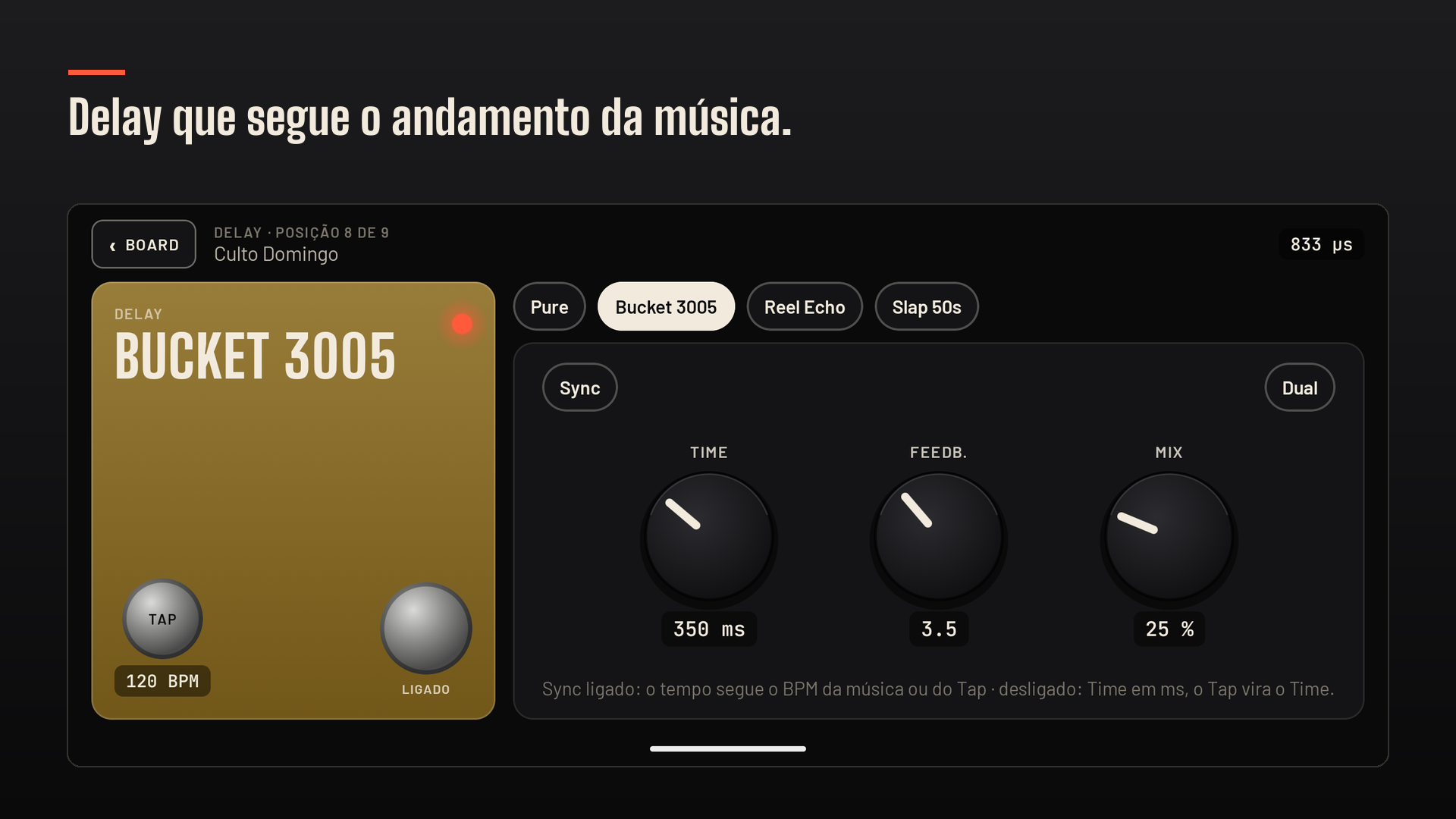
The delay follows the song, not the other way round.

Four voices — Pure, Bucket 3005, Reel Echo and Slap 50s — with the time locked to the song's tempo or to the tap, and a second tap on the same line. On the other side, seven reverbs: Room, Hall, Silver Plate, Nimbus, Shimmer, Cathedral and the Steel Coil spring.

The delay screen in RiffRig: the Bucket 3005 pedal with time, feedback and mix knobs, sync and tap tempo

Starting point

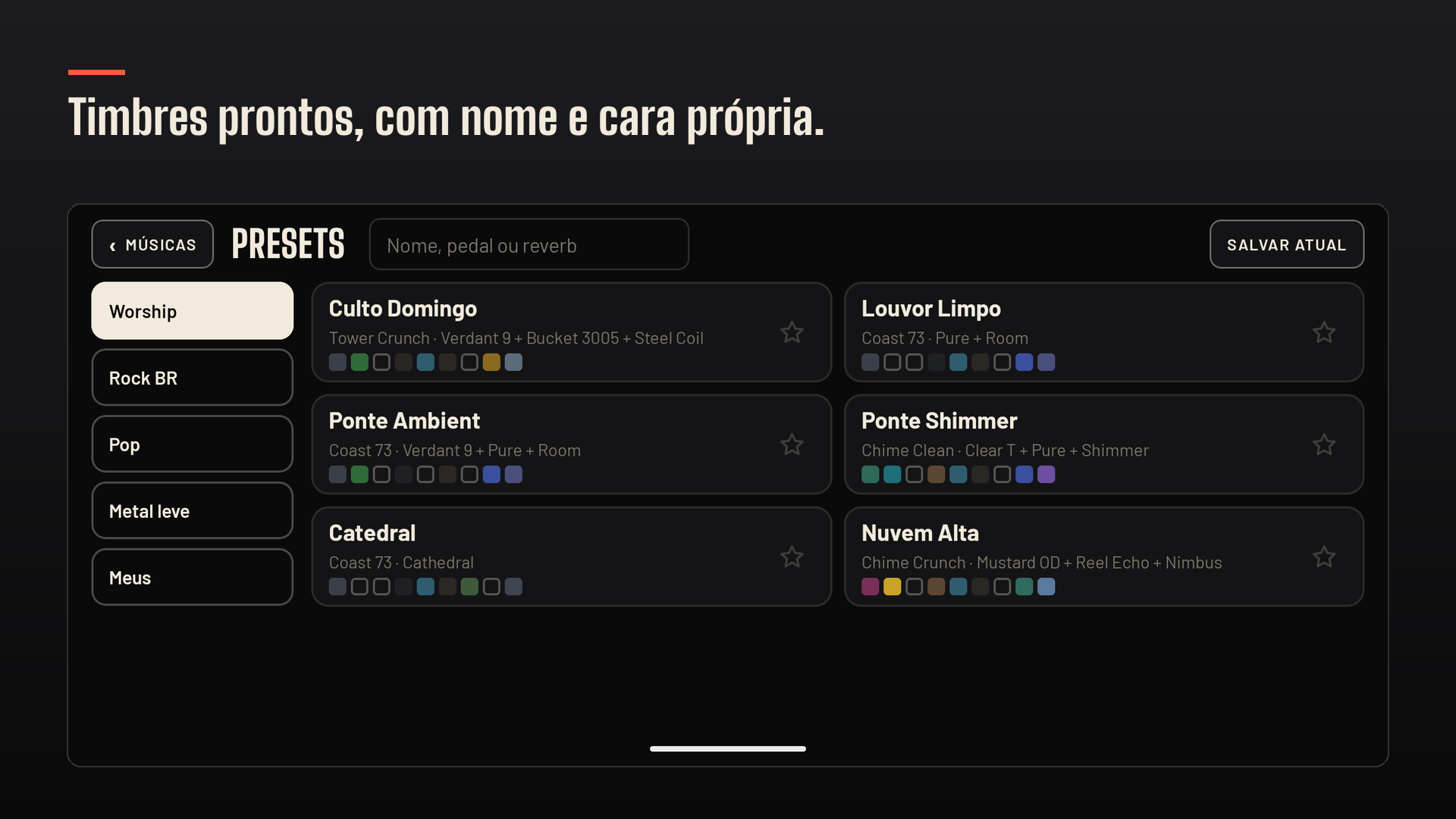
Tones with names, not "Preset 14".

The app opens with a bank of finished tones, sorted by where you play — worship, rock, pop, light metal. Each one shows its whole chain in the list, so you can tell what makes the sound before you load it. And ten drive models to build your own: Verdant 9, Sunset One, Rodent, Mustard OD, Indigo Blues, Woolly Mountain, Clear T, Aurum, Crimson Haze — and a slot for a capture of your own.

The RiffRig tone bank, each tone with its own name and its full chain

Pedalboard, laptop or RiffRig?

This isn't about dropping what you already own. It's about where each one wins.

 Hardware pedalboardPlugin on a laptopRiffRig
Fits in your backpackdepends on the sizelaptop + interfacethe phone you already carry
Tone change per sectionby bank, by handyesyes, from the setlist
Uses a capture of your ownrarelyyesyes, that is the default
Ready the moment it is onyesboot, driver, projectyes
Entry pricehighmediumlow
Needs an interfacenoyesyes, with a Hi-Z input

Questions from people who play.

Do I really need an audio interface?

To plug a guitar in, yes: an interface with an instrument (Hi-Z) input. A passive guitar straight into a line input sounds thin and bodyless — that's impedance, not the app. A simple interface is enough to start. Without one, Demo mode plays guitar loops through the real chain, so you hear the tones before you spend anything.

New to all this? We wrote a page from scratch about it (in Portuguese): o que é uma interface de áudio.

Does it work offline?

It does. After the first sign-in, playing never depends on the network — not to load a capture, not to change a preset, not in the middle of a gig.

Can I use my own captures and IRs?

You can, and that's the point. The app imports neural captures and impulse response files straight from the device, and shows what each one costs before loading — so you know whether it runs on your phone or crackles.

Is there an iPhone version?

Not yet. RiffRig starts on Android; the iOS version comes later — the reverse of how BassRig went. Leave your email at the bottom of this page and we'll tell you the day it lands.

What language is the app in?

Brazilian Portuguese, for now — English is on the list. The parts your hands use read the same either way: the blocks, the knobs, the meters and the model names are the same words in any language.

What does it cost?

A subscription, yearly or monthly, billed by Google Play — the price your store shows is the one that counts. The yearly plan starts with 7 days on us, because the only way to know whether it works for you is to plug your own gear in. Demo mode plays without subscribing to anything.

What do you record about me?

Your audio never leaves the device — nothing is recorded or uploaded. We log usage: when the app opens, whether you played through an interface, and which blocks and models you used, always by index, never by the name of your presets or files. It's all written in the privacy policy, and you can delete your account and those records inside the app.
on Google Play · Android first

Plug in and play.

RiffRig is on Google Play. Download it, hear Demo mode without subscribing to anything, and when you're ready to play your own guitar through it, the yearly plan starts with 7 days on us.

Android 8.1+ · audio interface with a Hi-Z input recommended

in development

Play on iPhone or iPad?

RiffRig starts on Android, the way BassRig started on iOS. Leave your email and we'll tell you the day iOS lands — no spam, just the heads-up.

You're on the list — we'll write the day iOS lands. 🎸